
Python can fetch an image page with a normal HTTP client, but parsing Google Images markup is a fragile way to build a product. The page structure changes, fields are inconsistent, and a script that worked yesterday may return an empty grid today. A structured image search API keeps the Python side focused on the data you actually need.
Short answer: send an authenticated POST request to the SearchCans Google Images API with t set to google_images, put the text query in s, and optionally choose a country. The response returns image records under data.images_results, including result positions, source pages, thumbnails, original image URLs, dimensions, and source names.
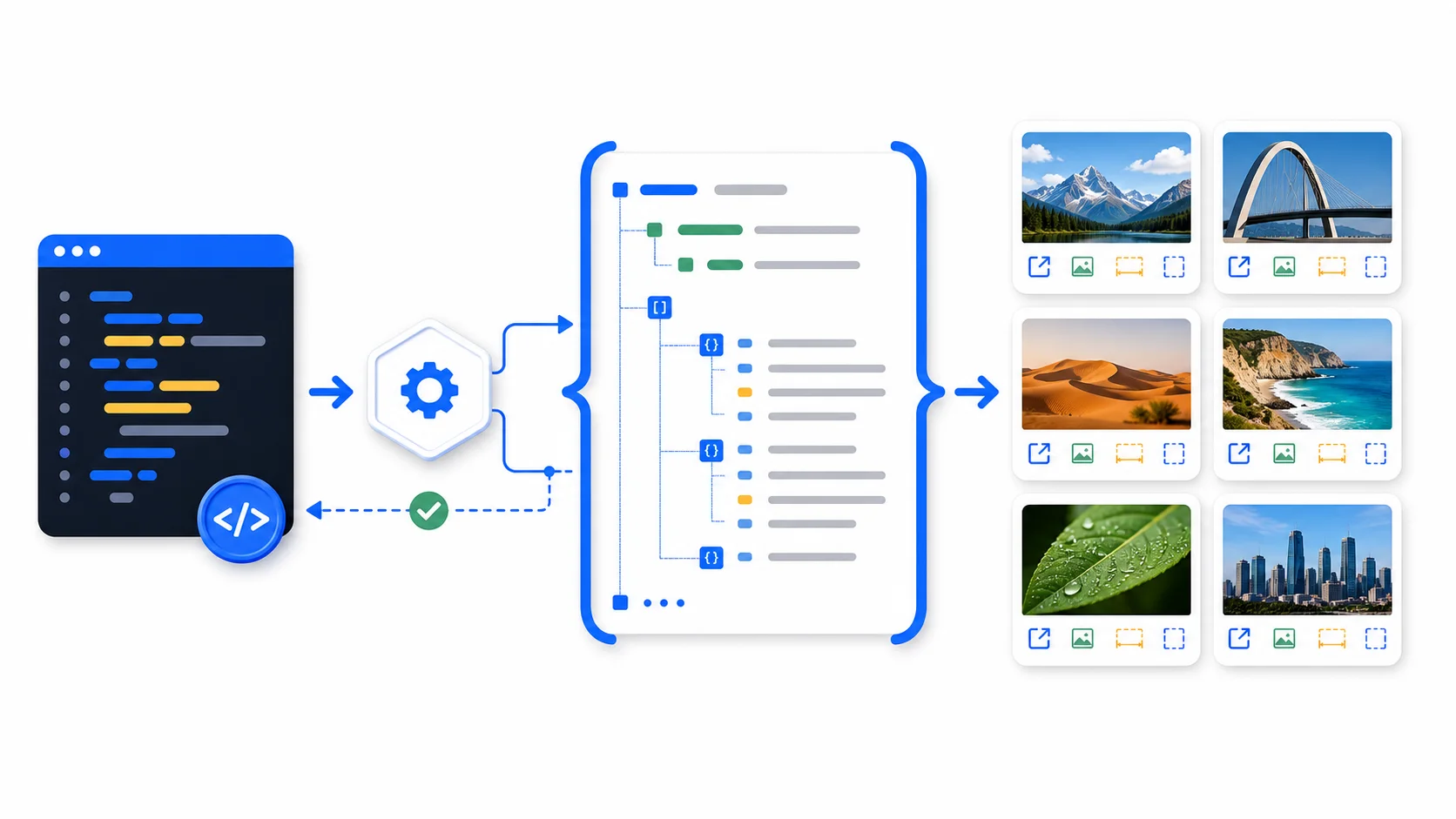
Figure 1. A text query becomes structured image result records that Python can filter before any image is downloaded.
Key takeaways
- The current endpoint is
POST https://www.searchcans.com/api/v1/search. - Use
"t": "google_images", not the older or provider-specific value"images". - The source page is in
link; the direct image asset is inoriginal; the preview is inthumbnail. - This tutorial covers text-to-image-result search. It does not upload an image or perform reverse-image matching.
- Keep the API key in an environment variable and review image rights before downloading or republishing any result.
What this Python tutorial builds
The finished script will:
- search Google Images with a text query;
- validate both the HTTP response and the SearchCans response envelope;
- read
images_resultswithout assuming every optional field is present; - filter by image dimensions and orientation;
- remove duplicate original URLs; and
- save selected metadata as JSON or CSV.
It will not scrape HTML, launch a browser, solve a CAPTCHA, or download every image returned by the search. Those are separate jobs with different operational and rights considerations.
Google Image Search API, Google Images API, and reverse image search
These phrases often get mixed together, but they describe different request shapes.
| Request | Input | Expected output | Covered here |
|---|---|---|---|
| Keyword image search | A text query such as electric cargo bike |
Ranked Google Images result records | Yes |
| Image download | A direct image URL | Binary image bytes | No |
| Reverse image search | An uploaded image or image URL | Visually similar images or matching pages | No |
| Image classification | Image bytes | Labels, objects, or embeddings | No |
SearchCans uses the first pattern in this tutorial. A request searches Google Images for text and returns structured metadata. Do not present the code below as an upload-based Google Lens or reverse-image API implementation.
Prerequisites
You need Python 3.9 or newer, the requests package, and a SearchCans API key. New SearchCans accounts receive 100 credits for initial testing.
Install the HTTP client:
python -m pip install requestsStore the key outside the source file. In Git Bash, macOS, or Linux:
export SEARCHCANS_API_KEY="your_api_key_here"In PowerShell:
$env:SEARCHCANS_API_KEY = "your_api_key_here"Never commit the real value to Git, paste it into a screenshot, or place it in a client-side application.
Make the first Google Images request
The smallest useful version is still strict about missing keys and API errors:
import os

import requests


API_URL = "https://www.searchcans.com/api/v1/search"
API_KEY = os.environ.get("SEARCHCANS_API_KEY")

if not API_KEY:
    raise RuntimeError("Set SEARCHCANS_API_KEY before running this script")

response = requests.post(
    API_URL,
    headers={
        "Authorization": f"Bearer {API_KEY}",
        "Content-Type": "application/json",
    },
    json={
        "t": "google_images",
        "s": "electric cargo bike",
        "country": "us",
    },
    timeout=35,
)
response.raise_for_status()

payload = response.json()
if payload.get("code") != 0:
    raise RuntimeError(f"SearchCans error: {payload.get('msg', 'unknown error')}")

images = payload.get("data", {}).get("images_results", [])

for image in images[:5]:
    print(f"{image.get('position')}. {image.get('title', 'Untitled')}")
    print(f"   source page: {image.get('link', '')}")
    print(f"   original: {image.get('original', '')}")
    print(
        "   size: "
        f"{image.get('original_width', '?')} x "
        f"{image.get('original_height', '?')}"
    )
There are two error layers on purpose. raise_for_status() catches HTTP failures. The code check catches a valid JSON response that reports an application-level error. Treating every JSON response as a successful search makes failures hard to diagnose.
Understand the image result fields
The response contains a data.images_results array. A result can include these fields:
| Field | Meaning | Practical use |
|---|---|---|
position |
Rank within the returned image results | Preserve result order |
title |
Title associated with the image result | Display and review context |
link |
Page where the result was found | Attribution and source review |
thumbnail |
Search-result preview URL | Lightweight preview UI |
original |
Original image asset URL | Candidate download or processing input |
original_width |
Original width in pixels | Resolution filtering |
original_height |
Original height in pixels | Orientation and resolution filtering |
source |
Source website name | Source grouping and review |
is_product |
Whether the result is marked as product-related | Commerce-oriented filtering |
The link field is usually the right place to investigate provenance. The original field points to an asset, not proof that the asset is licensed for your use. Search metadata and usage permission are separate questions.
Wrap the request in a reusable Python function
A helper keeps authentication, timeout, and response validation in one place:
import os
from typing import Any

import requests


API_URL = "https://www.searchcans.com/api/v1/search"


def search_google_images(
    query: str,
    *,
    country: str = "us",
    timeout_seconds: float = 35,
) -> list[dict[str, Any]]:
    api_key = os.environ.get("SEARCHCANS_API_KEY")
    if not api_key:
        raise RuntimeError("SEARCHCANS_API_KEY is not set")
    if not query.strip():
        raise ValueError("query must not be empty")

    response = requests.post(
        API_URL,
        headers={"Authorization": f"Bearer {api_key}"},
        json={
            "t": "google_images",
            "s": query,
            "country": country,
        },
        timeout=timeout_seconds,
    )
    response.raise_for_status()

    payload = response.json()
    if payload.get("code") != 0:
        message = payload.get("msg") or "unknown SearchCans error"
        raise RuntimeError(message)

    data = payload.get("data")
    if not isinstance(data, dict):
        raise RuntimeError("SearchCans response is missing the data object")

    images = data.get("images_results", [])
    if not isinstance(images, list):
        raise RuntimeError("images_results is not a list")

    return [item for item in images if isinstance(item, dict)]
The function does not silently retry. A production application can add bounded retries for connection failures and selected server errors, but it should not replay every request without understanding whether a prior attempt completed.
Filter by size, orientation, and duplicate URL
Image results are candidates, not a finished dataset. Filter metadata before downloading files:
from typing import Any


def select_landscape_images(
    images: list[dict[str, Any]],
    *,
    min_width: int = 1200,
    min_height: int = 630,
) -> list[dict[str, Any]]:
    selected = []
    seen_urls = set()

    for image in images:
        original = image.get("original")
        width = image.get("original_width")
        height = image.get("original_height")

        if not isinstance(original, str) or not original:
            continue
        if original in seen_urls:
            continue
        if not isinstance(width, int) or not isinstance(height, int):
            continue
        if width < min_width or height < min_height or width <= height:
            continue

        seen_urls.add(original)
        selected.append(image)

    return selected


results = search_google_images("electric cargo bike", country="us")
landscape_results = select_landscape_images(results)

for image in landscape_results:
    print(image["original"], image.get("source", "unknown source"))
This filter is intentionally conservative. It skips records with unknown dimensions instead of guessing. Change the thresholds to match the target layout, but keep the missing-field checks.
Save the metadata as JSON or CSV
Saving metadata is safer than immediately fetching every asset. It creates a review queue with the source page attached.
import csv
import json


fields = [
    "position",
    "title",
    "link",
    "source",
    "original",
    "original_width",
    "original_height",
    "thumbnail",
    "is_product",
]

with open("image-results.json", "w", encoding="utf-8") as file:
    json.dump(landscape_results, file, ensure_ascii=False, indent=2)

with open("image-results.csv", "w", newline="", encoding="utf-8") as file:
    writer = csv.DictWriter(file, fieldnames=fields, extrasaction="ignore")
    writer.writeheader()
    writer.writerows(landscape_results)
Keep link in both exports. A list of direct image URLs without the corresponding source pages is much harder to review responsibly.
Use the SearchCans Python SDK instead of raw requests
The official SearchCans Python SDK wraps the same endpoint and supports synchronous and asynchronous clients. Until you choose a tagged release, install the reviewed main branch explicitly:
python -m pip install "git+https://github.com/SearchCans/searchcans-python.git@main"Then use the image engine by name:
import os

from searchcans import SearchCans


with SearchCans(api_key=os.environ["SEARCHCANS_API_KEY"]) as client:
    response = client.serp.search(
        "electric cargo bike",
        engine="google_images",
        country="us",
    )

images = response.data.get("images_results", [])
for image in images[:5]:
    print(image.get("title"), image.get("original"))
Raw requests code is useful when one endpoint is all you need. The SDK is a better fit when the same application also uses Google Search, Google News, Reader, screenshots, account preflight, typed errors, or async requests.
Production safeguards worth keeping
Use explicit timeouts
Never let an outbound request wait forever. Set a client timeout slightly above the server-side timeout you intend to use, then record timeouts separately from empty result sets.
Bound retries
Retry connection resets and selected temporary server failures with backoff. Do not retry authentication errors, invalid parameters, or insufficient-credit responses. Keep the request count visible so a retry policy cannot create an unexpected burst.
Match concurrency to Parallel Lanes
Parallel Lanes describe simultaneous in-flight requests. They are not a monthly result quota. If a batch worker has three available lanes, keep no more than three requests active at once rather than launching a large unbounded task group.
Separate discovery from downloading
First search and filter metadata. Then review source pages and download only approved candidates. This reduces bandwidth, avoids unnecessary requests, and keeps rights review attached to the selected assets.
Do not hotlink production assets blindly
An original URL can expire, reject hotlinking, change content, or disappear. If your use is permitted, move the approved asset through your own controlled media pipeline and preserve attribution records.
Practical uses for structured image results
Visual content research
Collect result titles, source pages, and dimensions into an editorial review queue. Editors can compare themes and sources without opening every image result manually.
Brand and product monitoring
Run bounded searches for a brand, model name, or campaign phrase and compare the returned source pages over time. Image search can reveal where a visual appears, but it does not by itself prove ownership, sentiment, or infringement.
Multimodal retrieval pipelines
Use the result metadata to select candidate assets, then send only approved images to a vision model. Keeping search and model inference as separate stages makes failures and costs easier to inspect.
Commerce research
The is_product field can help prioritize commerce-related results. Treat it as a result attribute, not a guarantee that price, availability, or merchant details are current.
Cost and request planning
A successful standard Google Images request uses one SearchCans credit. New accounts receive 100 credits for testing, and current paid plans use prepaid credits rather than a required monthly subscription. Check the current SearchCans pricing page before estimating a production workload because plan terms and available lanes can change.
For a batch, estimate credits from the number of planned searches, then cap concurrent calls at the observed Parallel Lane count. Search once, reuse the structured response where appropriate, and avoid repeating the same query inside multiple downstream tasks.
Common questions
Q: Is this Google Cloud’s Custom Search JSON API?
A: No. The Python examples call the SearchCans Search API with the google_images engine. The input is a text query and the output is structured Google Images result metadata.
Q: Can this code search by an uploaded image?
A: No. It performs keyword-based image search. An upload-based reverse-image workflow requires a different request contract and should not be inferred from these examples.
Q: Does the original field grant permission to reuse an image?
A: No. It identifies an image asset found in search results. Review the source page, ownership, license, and intended use before downloading, republishing, or training on an image.
Q: Why keep both link and original?
A: link provides the source-page context needed for attribution and review. original is the image asset URL used by a downstream download or vision-processing step. They serve different purposes.
Q: Can I call the API asynchronously from Python?
A: Yes. The SearchCans Python SDK includes AsyncSearchCans. Keep the async task count within the account’s available Parallel Lanes and use bounded retries.
Q: How many credits does one Google Images request use?
A: A successful standard request uses one credit. Check current pricing and account information before a larger batch rather than assuming every workflow has the same cost.
Run one controlled image search
Start with one query and print five records. Confirm that the source page, original URL, dimensions, and title fit your application before adding downloads or concurrency. Review the live Google Images API documentation, create a free SearchCans account, and keep the first production version deliberately small.
