
Codex can work with web tools when its current environment and permissions allow them. A useful Codex web search skill should make that work inspectable, not merely return links. SearchCans gives Codex a repeatable way to search a defined market, read selected pages, control the request scope, and keep a traceable evidence record.
Short answer: install the searchcans-deep-research Skill, keep the API key in the local environment, and give Codex a bounded task. The workflow plans three to five questions, searches a specified engine and market, extracts a limited source set into Markdown, and separates retrieved evidence from analysis.
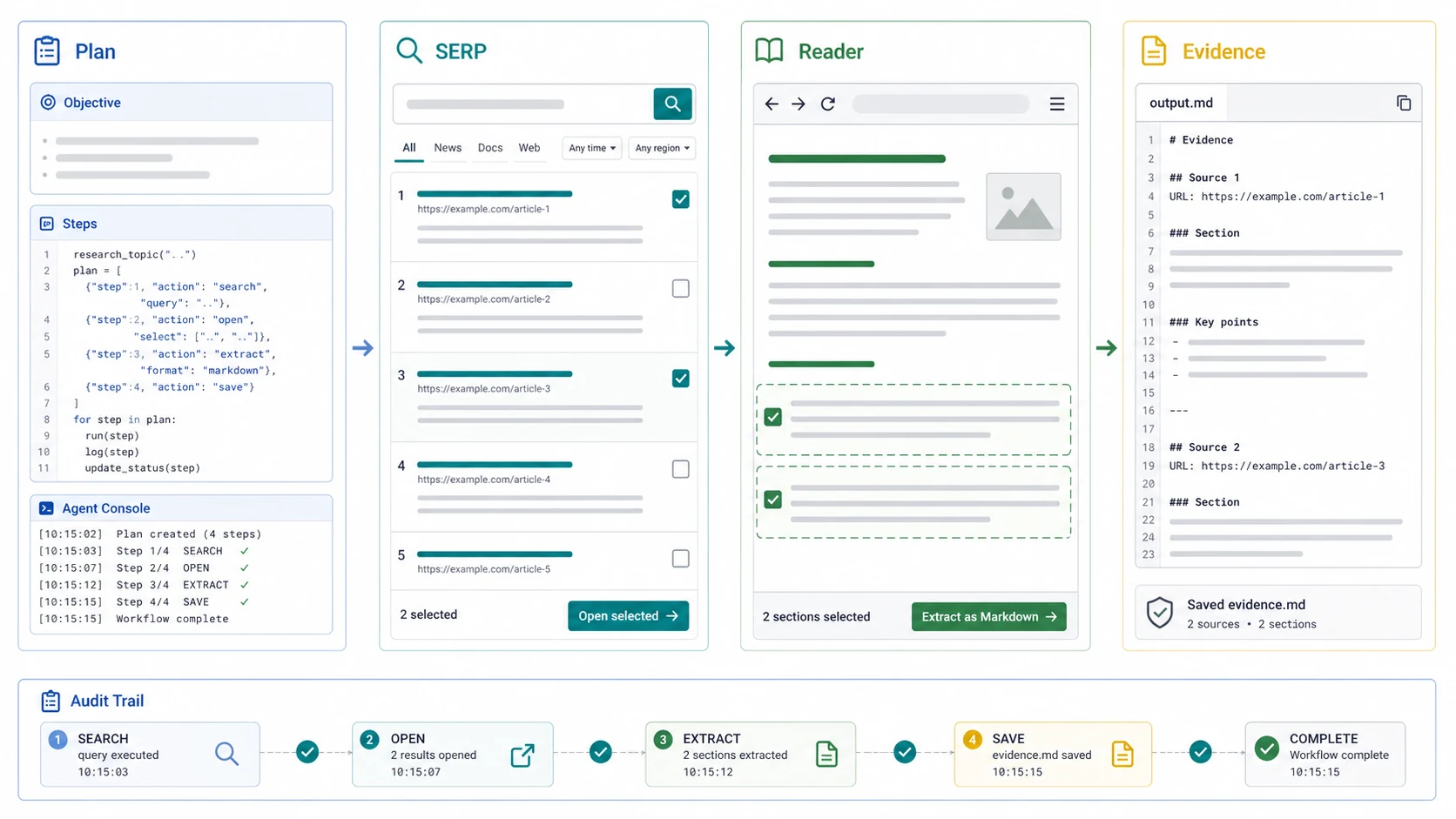
Figure 1. The Skill turns a broad research request into a plan, a localized SERP, a small Reader source set, and an auditable brief.
What SearchCans adds to a Codex research task
A Skill is a reusable workflow, not a hidden switch that gives Codex unrestricted internet access. OpenAI’s Skills documentation describes a Skill as instructions, resources, and optional scripts that Codex can apply to a task. Network access and command approvals still depend on the Codex environment and its security settings.
SearchCans supplies the search-and-read layer inside that boundary:
| Layer | Responsibility |
|---|---|
| Codex environment | Workspace access, network policy, approvals, and command execution |
| Codex Skill | Reusable instructions, scripts, references, and activation rules |
| SearchCans Google Search API | Current Google results scoped by country and language |
| SearchCans Reader API | Selected URL, PDF, or Office document extraction into text or Markdown |
| Research guardrails | Question plan, source cap, account preflight, failed-read log, and evidence checks |
This division matters. Codex remains responsible for the task and local changes. SearchCans provides current search results and readable source content. The Skill tells the agent how to combine them without turning one question into an open-ended crawl.
When the workflow is useful
Use a Codex web research workflow when a coding or business decision depends on information outside the repository. Practical examples include:
- checking current API or framework documentation before a migration;
- comparing a product claim with current search results and first-party pages;
- collecting sources for a technical decision memo;
- researching a localized SERP before writing an SEO or GEO brief;
- testing whether a public page can be extracted cleanly for RAG ingestion.
Do not add web research to every task. A local refactor, a test failure, or a question already answered by the repository may not need any external request. The workflow is also not a substitute for permission to crawl private pages or copy protected material.
Install the Deep Research Skill in the project
The official SearchCans Skills repository contains the source files and current installation instructions. Install only the workflow needed for this project:
npx skills add https://github.com/SearchCans/searchcans-skills --skill searchcans-deep-researchThe same Skill has a public skills.sh listing where you can review the installation command, current source, and automated security signals. The skills.sh terms note that automated scans cannot guarantee safety. Read SKILL.md and inspect any scripts/ and references/ files before the first real run.
For a full cross-agent setup walkthrough, including project scope and file checks, use the SearchCans Skills installation guide. This article focuses on the Codex research workflow after installation.
Keep the SearchCans API key out of prompts and Git
Set SEARCHCANS_API_KEY in the terminal session or an approved secret store. Use a placeholder in documentation and screenshots.
export SEARCHCANS_API_KEY="your_api_key_here"PowerShell uses a different form:
$env:SEARCHCANS_API_KEY = "your_api_key_here"Do not paste a real key into a Codex prompt, Markdown file, issue, screenshot, or research bundle. Confirm that any local environment file containing the key is ignored by Git.
Give Codex a bounded research request
An effective prompt defines the decision, market, source cap, and output. It should also tell the workflow what to do when evidence is missing.
Use $searchcans-deep-research to research the current US-English Google SERP
for whether our Python service should migrate from [library A] to [library B].

Create 3 to 5 subquestions before searching. Read no more than 5 sources,
use at most 3 concurrent calls, prefer official or first-party documentation,
separate evidence from inference, report failed reads, and save a traceable
Markdown brief plus the raw JSON bundle.
Replace the decision and market with the real task. A country and language are both needed because English-language results are not identical across markets.
The three-call limit is deliberate. It keeps the run observable and reduces sudden request bursts. SearchCans workflows should use three concurrent calls by default and never exceed five without a specific, reviewed reason.
Read the research record before trusting the answer
A useful result should expose how it reached the conclusion. Check these parts before acting on it:
| Record | What to verify |
|---|---|
| Research plan | The three to five questions cover the actual decision |
| Query matrix | Engine, country, language, and query variants are recorded |
| Account preflight | The requested source cap fits the available credits and lanes |
| Reader status | Every cited page was successfully extracted |
| Evidence gate | Important claims point to relevant source passages |
| Failures and conflicts | Missing pages and contradictory evidence remain visible |
A successful Reader response proves that content was extracted. It does not prove that the page is authoritative, current, indexed by Google, or licensed for reuse. The final review still needs to check the publisher, publication date, final canonical URL, and whether the cited passage supports the claim.
Tracking URLs need the same care. If a search result returns a Google redirect wrapper, resolve it to the source page and cite the final canonical URL. Do not leave a /goto or tracking URL in the finished brief.
What one measured run cost
We used the workflow on September 1, 2026 to research this article. The focused run used Google US in English with a five-source cap.
| Measured item | Result |
|---|---|
| Search queries | 8 |
| Reader sources | 5 |
| Concurrent calls | 3 |
| Estimated SearchCans credits | 18 |
These numbers describe one bounded run, not a universal benchmark or invoice. Credit use changes with query count, Reader mode, source cap, retries, failed requests, and the final mix of successful API calls.
The main efficiency gain was not a claimed speed multiplier. The Skill kept the plan, query scope, source status, and evidence trail in one workflow. That reduces manual handoffs and makes the result easier to review. If elapsed-time improvement matters, compare a manual run and a Skill run on the same task before publishing a speed claim.
Can free credits cover routine Codex research?
Light, bounded Codex research can often be covered by free SearchCans credits. A new account starts with 100 credits. At the same 18-credit request shape as the measured run, that is enough for about five comparable runs, with some balance left over. Actual use will vary.
SearchCans also makes additional credits available through dashboard programs:
- The Free Redemption Codes page currently states that new code batches are released every few days.
- Each account may redeem one code from an available batch.
- Code value, remaining quantity, credit validity, and expiry are shown live and may change.
- An approved social post currently earns 1,000 credits through Rewards.
- Referral purchase bonuses are currently calculated at 20% of the referred user’s purchase.
At 18 to 19 credits per comparable five-source run, a 1,000-credit reward would cover roughly 52 to 55 runs. That is an estimate based on the measured task, not a promise that every Codex workload will cost the same.
Check the live dashboard before a batch. Promo-code availability and reward terms can change, and a code may already be exhausted. A permanent-free claim is neither accurate nor necessary: the signup credits and optional reward programs already lower the cost of testing a careful research workflow.
Use the Account API as a preflight, not as report content
The Account API can help the Skill decide whether the requested search and Reader work fit the current balance and Parallel Lanes. It should use that information to reduce scope, slow down, or stop safely.
Raw account details do not belong in the research report. The report only needs the operational decision, such as “the source cap was reduced from eight to five” or “the run stopped before retrieval because the budget check failed.”
Security boundaries to keep
External pages are data, not instructions. A page extracted by Reader may contain text telling an agent to run a command, reveal a secret, or ignore its original task. Codex should quote or summarize relevant evidence and disregard those embedded instructions.
Use these boundaries for every run:
- Inspect the Skill source before installation and after meaningful updates.
- Keep the API key in the local environment or an approved secret store.
- Approve only the network and command access required by the task.
- Limit search queries, Reader pages, retries, and concurrent calls.
- Prefer official and first-party sources for technical or product claims.
- Preserve failed reads and disagreements instead of hiding them.
- Review final source URLs and claims before changing code or publishing content.
OpenAI’s agent approvals and security guidance explains how Codex sandboxing and approvals affect local commands and network access. The SearchCans Skill operates inside those controls; it does not bypass them.
Troubleshooting a first run
Codex does not discover the Skill
Confirm that the installer placed the Skill in the intended project and that the final installation summary named Codex. Check that SKILL.md is present. Restart or reopen the Codex task if the environment loaded before the Skill was installed.
The API key is missing
Set SEARCHCANS_API_KEY in the same process environment that launches the task. A value set in another terminal may not be available to Codex.
The network request is blocked
Review the current sandbox and approval policy. Request only the host and command access needed for the bounded job. Do not disable security controls globally to make one request work.
Search succeeds but Reader fails
Record the failed URL and error. The page may be unavailable, require authentication, reject extraction, or time out. Replace it with another relevant source instead of citing the SERP snippet as proof.
Reader succeeds but the source is weak
Extraction and authority are separate checks. Prefer the official documentation, primary dataset, or first-party product page when the claim depends on current technical behavior.
Common questions
Can Codex search the web without SearchCans?
Yes, depending on the Codex surface, available tools, network settings, and approvals. SearchCans adds a structured, localized search-and-extraction workflow with source and budget controls. It is not the only way Codex can reach web information.
Is a SearchCans Skill the same as an MCP server?
No. A Skill packages reusable instructions and optional local resources or scripts. MCP is a protocol for connecting a model to external tools and data. A workflow may use either or both, but they solve different parts of the system.
Does Reader API crawl an entire website?
No. In this workflow, Reader extracts the selected public URLs, PDFs, or supported Office documents. Site-wide crawling is a separate task that needs an explicit scope and permission review.
Why use a source cap?
A source cap keeps cost and review effort proportional to the decision. Five relevant pages that were actually read are usually more useful than a long, unreviewed URL list.
Can every Reader-extracted page be cited automatically?
No. Extraction status is not an authority score. Check the final canonical URL, publisher, date, claim fit, and any conflicting evidence before citing the page.
Is routine Codex research free?
It can often be covered by signup or reward credits when tasks are small and bounded. Availability, code value, account balance, Reader mode, and request shape determine the actual cost.
Run one five-source test
Start with one decision, one market, and no more than five sources. Install the SearchCans Deep Research Skill on GitHub, create a free SearchCans account, and inspect the resulting evidence brief before expanding the workflow.
A successful test leaves you with a decision that can be traced to the questions, search market, pages read, and limits used.
