
A deep research agent should leave a review trail. Readers should be able to see the questions, the market, the pages it read, and the limits used for the job.
SearchCans supports this process with a SERP API to find pages, a Reader API to read them, and an account check that caps the job.
Short answer: plan three to five questions, search one market, read a small set of pages, check each key claim, and cap the job before it spends too much.
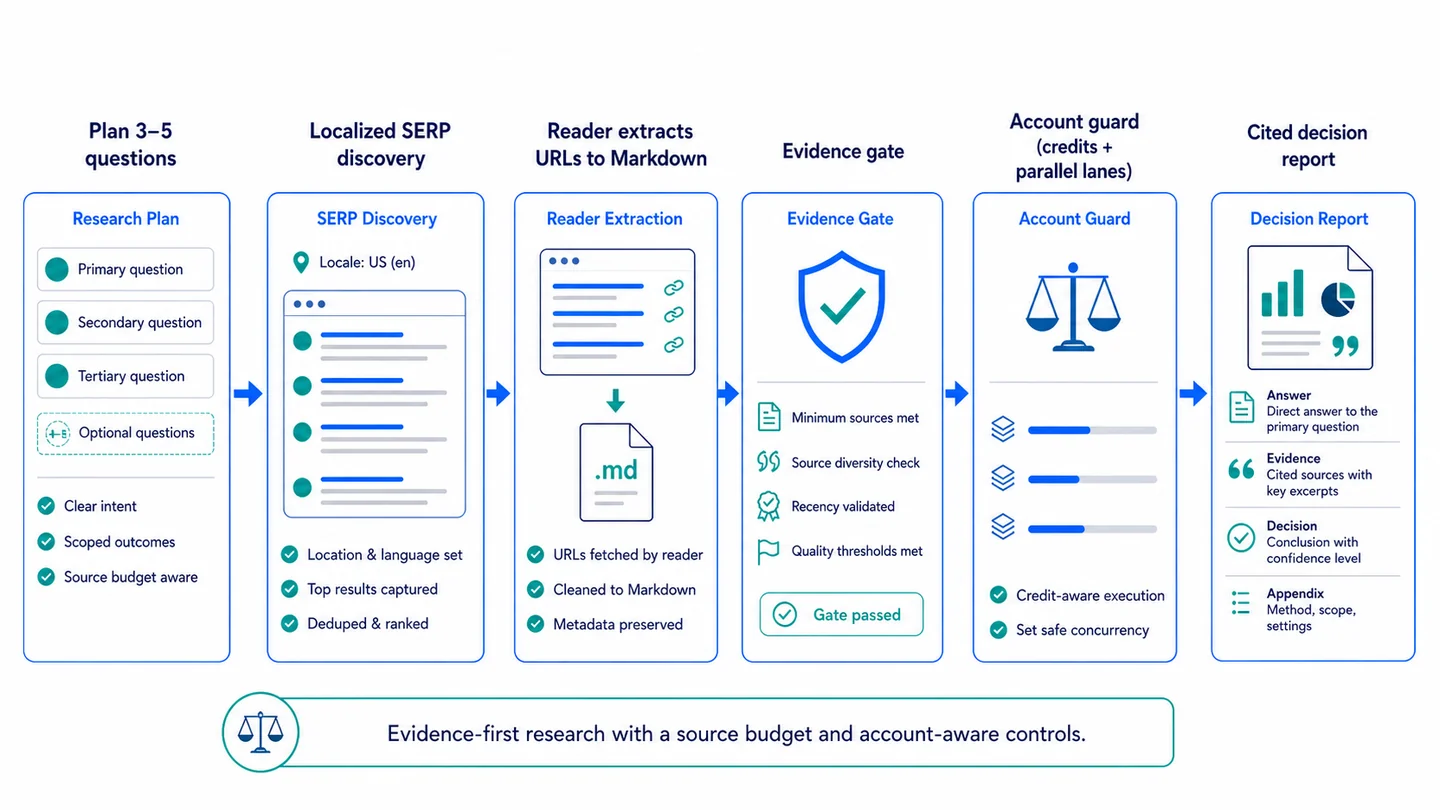
Figure 1. A research loop with a source cap and account-aware controls.
What a good run shows
Make these six items clear before the agent writes its answer:
- Scope: the questions it must answer.
- Market: the engine, country, and language it used.
- Proof: the URLs it read.
- Gaps: what it could not prove.
- Cap: the most pages it may read.
- Account check: why it ran, slowed down, or stopped.
The record shows what the agent checked and where it stopped. It also keeps a broad prompt from turning into an endless crawl.
Plan three to five questions
Give each question one clear job. Use this small plan:
| Job | Ask | Get |
|---|---|---|
| Main fact | What must be true for this choice? | A core answer |
| Options | What are two or three paths? | A fair set to compare |
| Proof | Which first-party page can show it? | A page to read |
| Risk | What cost or limit can change the choice? | A stop sign |
| Gap | What still needs a check? | A next step |
For a US SaaS team that needs an analytics tool, ask four things: which needs matter, which features each firm lists, which limits may hurt the plan, and what is still not clear.
The plan gives the agent a stop point and tells a reviewer what it did not try to prove.
Search one market
Set the engine, country, and language for each search. English is a language. It is not a US market by itself.
market = {"engine": "google", "country": "us", "language": "en"}
question_count = 4
max_reader_pages = 5
SERP means a search-engine results page. Use the SearchCans Google Search API to find pages, People Also Ask questions, and related terms.
Use the SERP to find leads. Do not use one results page to claim traffic, search size, or a future rank.
Read pages before you cite them
Pick a small set of pages. Start with a firm’s own docs, a primary source, or a strong third-party report.
Then do four simple steps:
- Pick a page that can answer one plan question.
- Use the SearchCans Reader API to turn it into Markdown.
- Use page rendering only if the first read misses key text.
- Log a failed read. Do not turn a failed read into a claim.
Use a short log: URL | read status | why it failed | next step.
A SERP result can point to a page. A page can back a key claim only after the agent reads it.
Check proof before you write
Make a small proof list before the model writes the final answer.
| Item | Keep |
|---|---|
| Claim | The exact line you plan to write |
| URL | A page that the Reader returned |
| Page type | Primary, official, or third party |
| State | Fact, view, or open gap |
| Note | Date, conflict, or next check |
Use a failed or blank page as a failed read, not as proof. If two good sources disagree, say that in the answer. For example: “The firm lists the feature. A third-party report says the setup needs more tests.”
Readers can then tell documented facts from open questions and opinions.
Check credits and lanes first
Extra calls help only when a key gap remains. A large job can use up credits, and too many calls at one time can hit the account limit.
Before a batch starts, call the SearchCans Account API. Check the credits left and the number of Parallel Lanes. Parallel Lanes are the calls that can run at the same time. Read the rate-limit guide
Use this rule:
Enough credits and lanes?      Run the plan.
Enough credits, few lanes?    Use fewer workers or fewer pages.
Too few credits to read pages? Stop and say what the user needs next.
Keep the raw account data out of the final report. Show only the plan, the pages read, and the choice to run, limit, or stop.
Start with this small setup
| Set | Start with | Why |
|---|---|---|
| Engine | The search source is clear | |
| Market | One country and language | The result has a clear use |
| Plan | Four questions | The task stays small |
| Reader cap | Five pages | Cost stays in view |
| Workers | Your safe account limit | The batch stays stable |
Run the same order each time:
- Search one market.
- Read the best few pages.
- Check proof and account state.
- Give the answer, sources, and open gaps.
How this helps GEO
Generative engine optimization (GEO) does not promise an AI citation or a rank. It helps a page give clear, checkable facts to both people and machines.
This page uses five GEO elements:
- A direct answer near the top.
- Headings that match real user questions.
- Clear names for SERP, Reader, credits, and Parallel Lanes.
- Links that show where key facts came from.
- Visible FAQs with short, direct answers.
The same elements help SEO writers keep search clues, facts, and advice apart.
Common questions
Q: How many pages should a deep research agent read?
A: Start with a small cap that can answer the plan. Five pages is a good first test. Read more only when a key gap remains or good sources clash.
Q: Can an agent cite a SERP snippet?
A: No. A snippet is a lead. Read the page first. If the read fails, log the failure and pick a new page.
Q: Why check account state before research?
A: The check sets a safe page cap and worker count. It also gives a clear reason when the agent must slow down or stop.
Build with SearchCans
Run one small loop first: search one market, read five pages, and check the proof. Add a cache, a domain list, or human review only when the job needs it.
Review the SearchCans SERP API, Reader API, and Account API. Or install the SearchCans Deep Research Skill:
npx skills add https://github.com/SearchCans/searchcans-skills --skill searchcans-deep-research
For a close use case, see our guide to automated AI fact checking with SERP data.
New accounts can test the flow with the current code from Dashboard → Free Redemption Codes after they sign in.
Sources
- NVIDIA Deep Researcher Agent documentation: a model for plans, repeat research, gap checks, and citations.
- SearchCans Google Search API, Reader API, Account API, and Rate Limits & Parallel Lanes: product guides for the steps in this article.
